Search and Filters
Lifebook offers two ways to narrow the timeline:
- Search text in the main menu search box.
- Filters in the filter column.
These features work in the timeline list view.
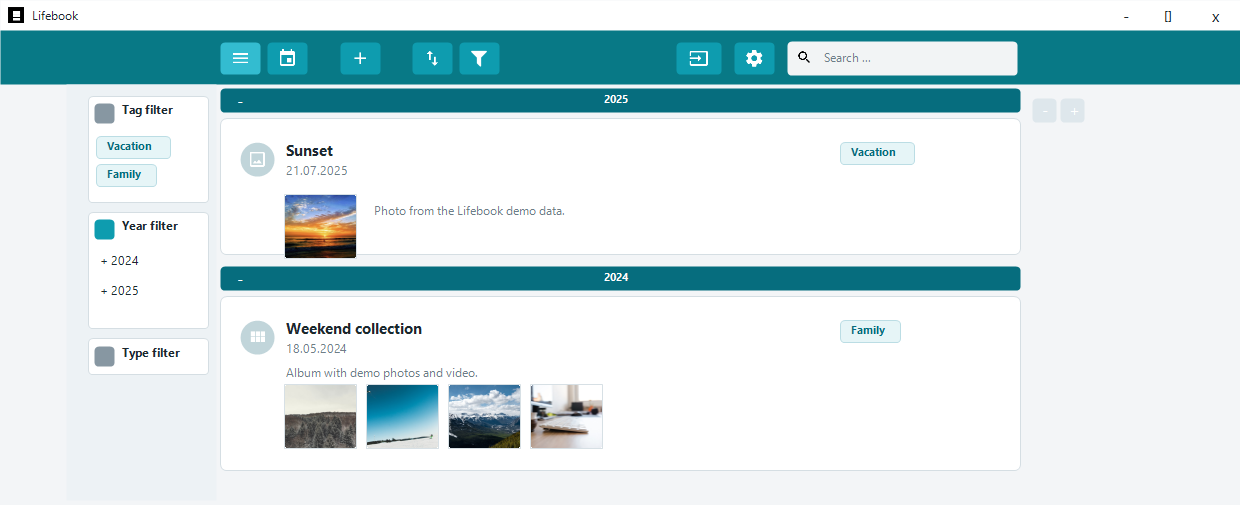
Search Box
The search box searches entries in the list. It can match:
- Entry titles
- Text entry content
- Captions and other searchable entry text
- Tags
- Items inside photo albums, when relevant
- Names of recognized people, when face recognition is enabled
Matching text is highlighted in the list and overlay.
The result count and filter chips above the list show how the timeline is narrowed.
Search Categories
Use the category dropdown in the search box to limit search to an entry type.
The All category searches every available entry type.
In calendar view, the toolbar shows Search timeline instead of the search box. Use it to switch back to the timeline and start searching.
Filter Column
Open the filter column with the filter button in the main menu or Ctrl+T.
The filter column contains:
- Tag filter
- Year and month filter
- Type filter
- People filter, when face recognition is enabled
It appears to the left of the main list. You can adjust the width of the filter column by dragging its edge.
Tag Filter
The tag section lists tags you can use to narrow the list.
Choose a tag to show entries with that tag. You can also sort or clear the tag list.
Choosing a tag replaces any year, month, or type filter.
Year and Month Filter
The year section lists years that contain entries.
Choose a year, or expand it and choose a month. You can also sort or clear the date list.
Choosing a year or month replaces any tag or type filter.
Search and filters narrow the year and month lists together.
Type Filter
The type section filters by entry type, such as:
- Text
- Image
- Video
- Audio
- Photo album
Choosing a type replaces any tag, year, or month filter.
People Filter
When face recognition is enabled, the People Filter section lists all confirmed people with their face thumbnails. Select one or more people to show only entries where they appear.
See Filtering by person.
Clearing Filters
Each filter section has its own clear button. Closing the filter column clears tag, type, year, and month filters.
The chip row above the list lets you clear individual filters. Clear all clears the search text and all filters at once.
The filter button in the main menu shows whether the list is narrowed.
How Search and Filters Work Together
You can combine search text and filters. For example, search for a word, then filter the results by year.
The timeline updates immediately as you search or filter. Groups with matching entries open, and the result count changes as the list narrows.